It would be highly beneficial to have a public REST API (or GraphQL API) that allows users to programmatically add, update, and manage tasks (stories), projects, and swimlanes.
Such an API would enable integration with internal systems, automated reporting, AI-driven task creation, and synchronization with external tools like CRMs or document management systems.
Since our architecture is a backend and an SPA, we have in fact a full REST API already! We will put up a documentation online with a Swagger UI coming next version, so you can play with it.
First of all, congratulations on the work done up until now with Tenzu, I’m currently testing some project management solutions and comparing Taiga with Tenzu, and I hope to end up using the latter because it has potential.
My main request right now is to be able to programmatically interact with the Taiga API. I’ve auto-generated an initial python package for that using the Swagger docs, but I’m struggling with the authentication part, not being able to retrieve the correct Authentication Token. Right now I’m testing it against a locally hosted instance (I followed the Quickstart guide in the docs for that), can someone guide me through this?
Up until now I’ve tested the TokenObtainPairInputSchema object and the /api/v1/auth/token endpoint that seems to return a TokenObtainPairOutputSchema object, which seems to provide an `access` string, which I consider it to be the auth token… But it hasn’t worked neither from my python scripts nor the Swagger API docs page of my instance.
Any thoughts on this? Am I overcomplicating it? Is there any way to use basic authentication instead? Thanks!
To use the Tenzu API programmatically, you are going in the correct direction.
For authentication, we have adapted django-ninja-jwt so you can look at their documentation for help: there won’t be much of a difference.
It is indeed the access token that you need to use. To use it, you need to add a header to your request “Authorization: Bearer ”. The “Bearer “ prefix is required.
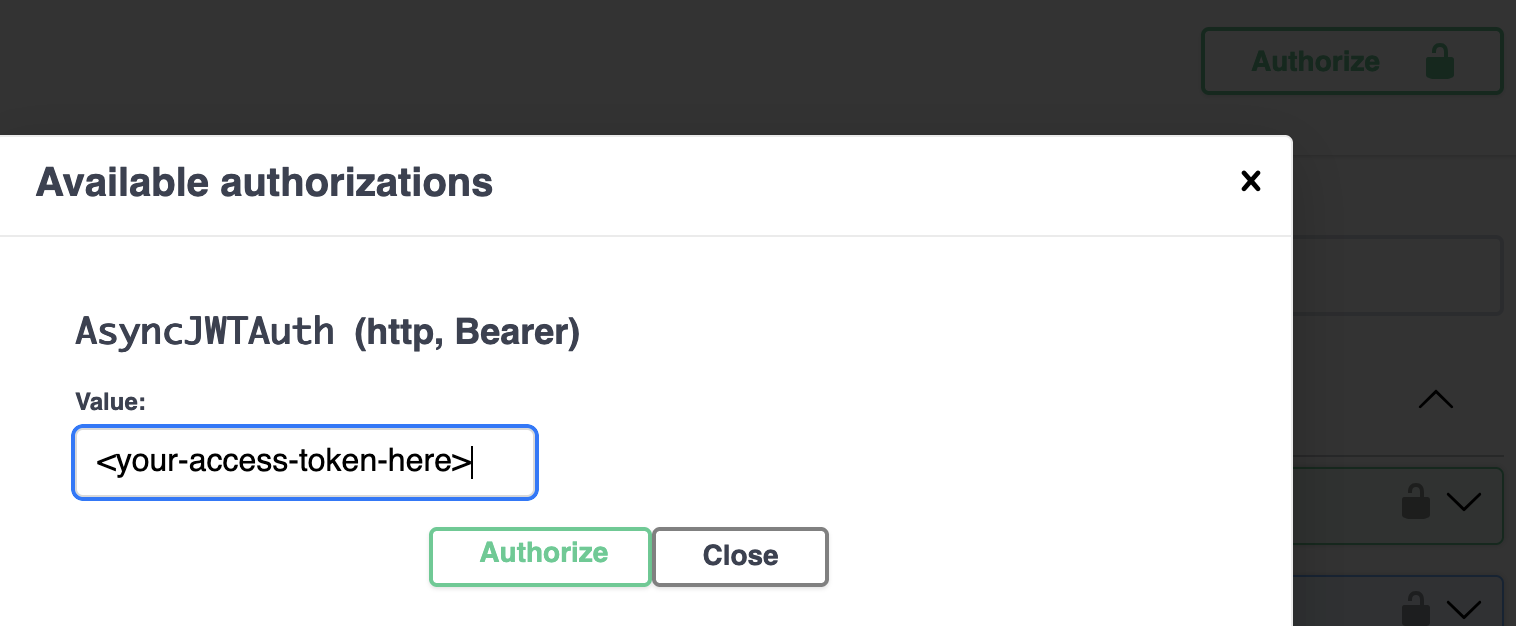
If you use the provided swagger at “/api/v1/docs”, this prefix is added for you and you only need to fill the access token in order to use any authenticated route (I have added a screenshot of how to authenticate using the swagger).